
Export 3D Panorama
|
|
To export the Heron® measurable spherical images with xyz coordinates in the image background. Both Full HD panoramic images (acquired in continuous) and one shot 5K panoramic images are supported. The process generates a structured point cloud at the resolution of the panoramic image (Full HD or 5K) in correspondence of each selected panoramic images. The so called “3D Panorama” can directly exported as E57 or in Autodesk ReCap®, and saved as Grids inside Reconstructor®. |

 This functionality allows to generate and export RGB point clouds when using Heron LITE Color.
Select the Export 3D Panorama command in the Heron top toolbar; a Recently used item dialog allows to select the Heron® Survey you want to export from the proposed list.
In the next dialog you have different options.
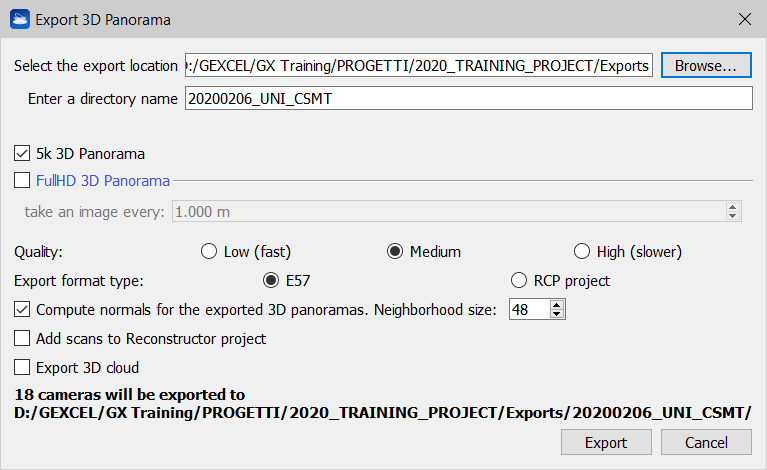
- Enter a directory name defining an output sub-folder that will be saved in the folder defined in Select the export location.
- Flag 5k 3D Panorama if one shot 5k images are captured during the survey and you want to use them to also export panoramic views (cameras) in high resolution. You can also use these cameras to extract and colorize structured point clouds hereafter referred to as "scans") at each panoramic view.
 In doing so, colorizing HERON® LITE Color data is very simple and fast!
 - In the same way, Flag FullHD 3D Panorama to use FullHD panoramas acquired in continuous to extract panoramic views from them and create colored structured clouds.
 This option is available only in the HERON® MS Twin and HERON® AC-2 Color series and it is disabled for HERON® LITE data.
Point Density options
- The density of the extracted point cloud(s) can be defined by selecting Low / Medium / High Quality settings. The higher the quality, the slower the export process but the denser (with gap filling) the final point cloud in the background of spherical image.
- low: the point cloud in the background of the spherical image has the density of the original Heron point cloud
- medium: the point cloud in the background of the spherical image has the density of the Heron point cloud rendered with the splat rendering option
- high: the point cloud in the background of the spherical image has the density of the Heron point cloud rendered with the splat rendering option and with an additional depth filling.
Export options
- The colored point clouds can be exported as .e57 structured point clouds associated with 3D panoramas at full resolution (5K or Full HD, as applicable); they can thus be available in third party software.
- Alternatively, the colored point clouds can be exported in a .rcp ReCap® project with relative 3D panoramas at full resolution (5K or Full HD, as applicable), visible in RealView.
Advanced options
- Flag the option Compute normals for the exported 3D panoramas to improve the resulting structured point clouds' normals computation and their orientation, accordingly.
- Flag the option Add scans to Reconstructor project if you want to add to your Reconstructor® project the .rgp structured scans created in correspondences of any 3D panorama.
- Flag the option Export 3D cloud if you want to export also the original 3D point cloud beside single 3D Panoramas.
In the bottom, the number of used cameras and 3D Panoramas is reported.
 If a HERON survey includes static scans, only the Heron clouds with associated trajectories are exported.
Click the Export button to start the export process. At the end of the process a pop up window allows to open the folder where export is saved.