
Match Editor
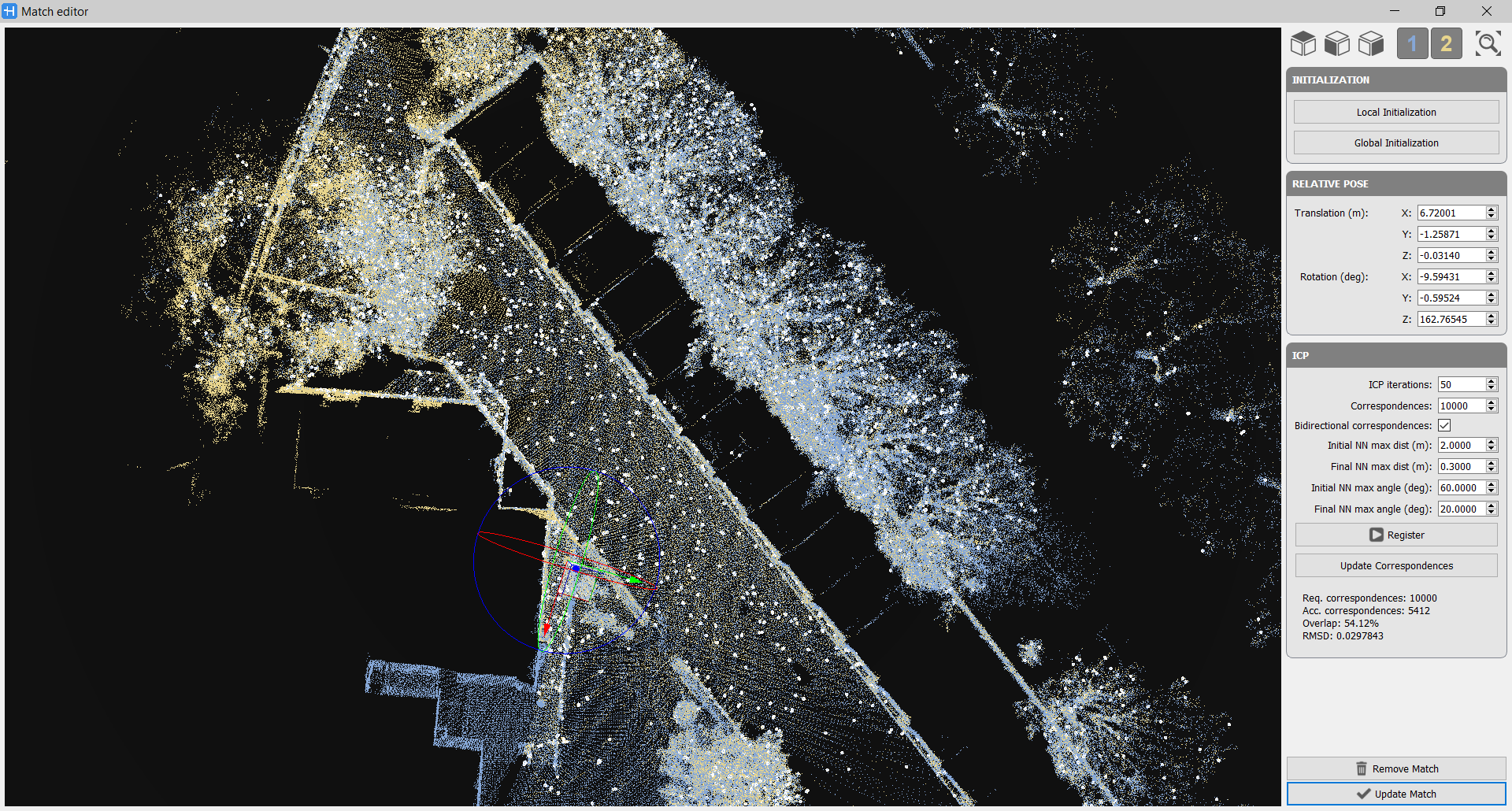
The Match Editor window is to pre-align two selected local maps and refine the alignment by an ICP process.
Navigation
|
|
Select these predefined views to move the point of view in the 3D View, according to the selected one. |
|
1 and 2 |
Select/unselect the buttons to show/hide point cloud 1 (the reference one) and point cloud 2 (the moving one) |
|
|
Select this button (or Ctrl+F) to zoom the view on the couple of local maps. |


Initialization
In this session you can choose how to define the initial position of the local maps.
- Local Initialization: It's the default setting. It uses the current poses of the maps.
- Global Initialization: It performs a global registration between the two maps.
Relative Pose
In the Match Editor window, it's possible to manually move and rotate the mobile Local Map by using the Move and Rotate Tool’s manipulator.
The same purpose have the parameters in Relative Pose regarding Translation (m) in X,Y and Z direction and Rotation (deg) on X,Y and Z axes.
ICP
- ICP Iterations (#): Minimum number of iterations running in the ICP algorithm.
- Correspondences (#): Number of points in cloud A that will be used to retrieve correspondences in cloud B. Only compatible pairs will be used for registration.
 It's suggested not to significantly increase the number correspondences, because it may slow down too much the selection. Few hundreds (e.g. 400) could be generally be a good upper limit.
- Bidirectional correspondences: If not enabled, N points in cloud A will be randomly selected and their counterpart will be queried to cloud B. If enabled, N/2 points in cloud A will be randomly selected and their counterpart will be queried to cloud B meanwhile N/2 points in cloud B will be randomly selected and their counterpart will be queried to cloud A. This is particularly useful when one local map is very small and the other is very large (only selecting points in the large map would produce a very small overlap, while only selecting points in the small map would produce a 100% overlap).
The next parameters are used to have and advanced control on how nearest neighbours (NN) are retrieved during the ICP iterations.
- Initial NN maximum distance (m): In the first ICP iteration, all correspondences whose points are compatible with the maximum distance will be accepted as valid.
- Final NN maximum distance (m): In the last ICP iteration, tolerances in distances must be lower than this set value.
- Initial NN maximum angle (deg): In the first ICP iteration, all correspondences whose points are compatible with the maximum angle will be accepted as valid.
- Final NN maximum angle (deg): In the last ICP iteration, tolerances in angles must be lower than this set value.
In the lower part of the window the analytical result of the ICP process are displayed: the requested and accepted correspondences, the overlap between the local maps and the RMSD error in centimetres.
If only the value of correspondences is changed simply select the Update correspondences button to optimize the process.
|
|
After setting the parameters (below explained) click the Register button to start the ICP fine alignment. |

|
|
At the end of the process, click the Update Match button to apply the process just done (if it is satisfactory) |
|
|
or click the Remove Match button to refuse the process just done. |

