Clean Data
|
|
This process cleans the maps isolating moving object data (as for example people walking, moving cars, etc.) from the point clouds. It is an optional step and must be run only after the Global Optimization process. |

Configure the parameters, and then click the Process button.
The explored space will be analysed to classify the points inside of it as fixed or moving points. This classification is saved in a *.vdb file.
At the end of the process, confirm with  Accept.
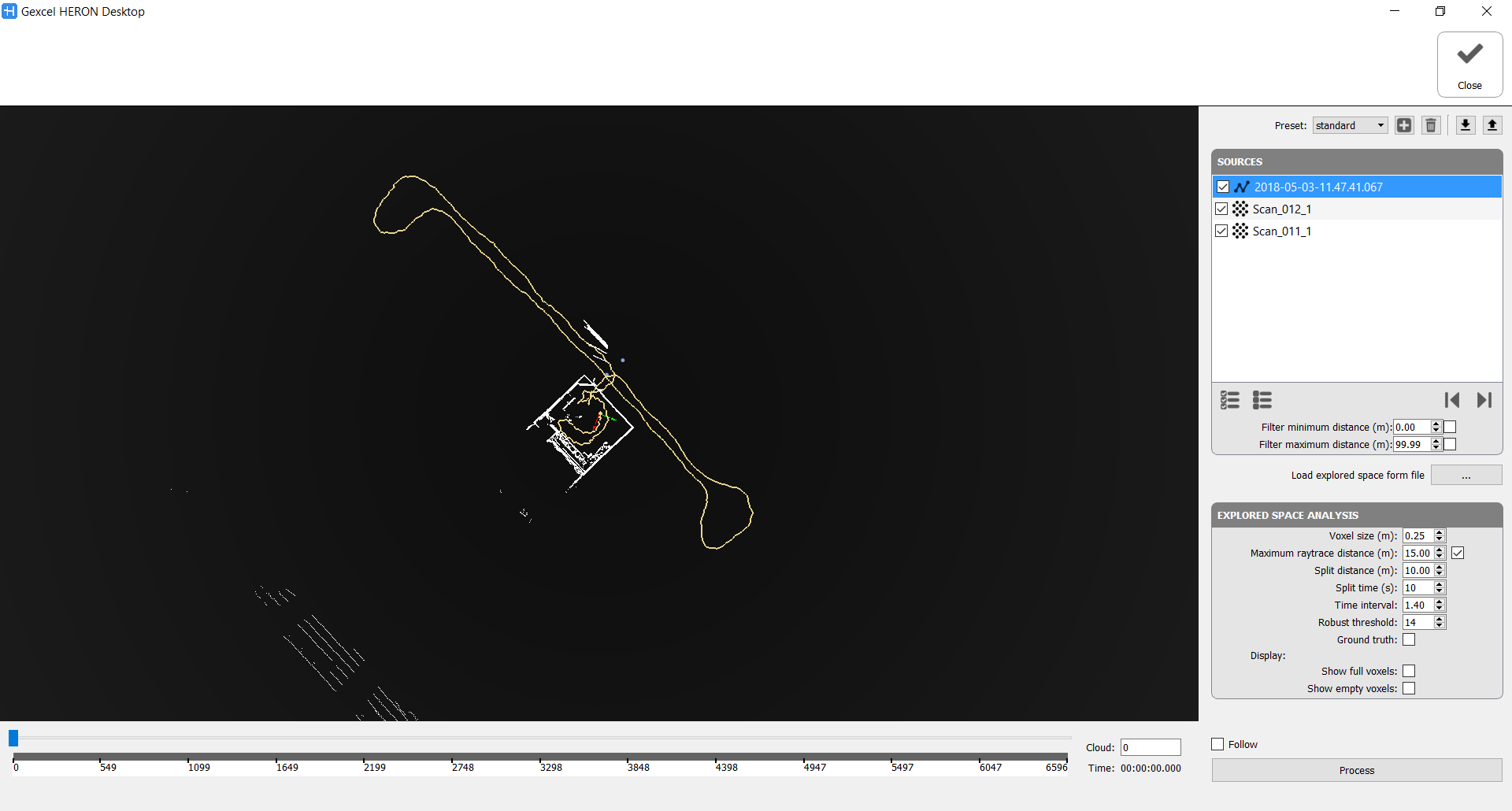
It's possible to use a standard/user defined preset or manually change the current parameters.
Sources
Here the point clouds to clean are listed. If the Clean Data command is referred on a Global Optimization group all the point clouds processed during the elaboration are taken in account and selectable.
For what that concern the Heron® tracklets a filter in minimum and maximum distance is applicable, as well as for a selection of the point cloud to process by defining the starting and ending positions.
Load explored space from file: to load a previous cleaning process saved in a *.vdb file.
Explored Space Analysis
- Voxel size [m]: Data cleaning analysis is based on cubic cells. Decrease this parameter if the survey is in a small close space, increase it if your points are all distant from the centre of the acquisition.
- Maximum raytrace distance [m]: The analysis treats only the points under this distance, if the box is checked. In the open field it could take a long time if a great distance is set. Use it to optimize the processing time.
- Split distance [m]: Create a local map (for computation purpose only) every X meters or Split time [s]: create a local map (for computation purpose only) every X seconds.
If not too much objects are present it could be useful to set large values - Time interval (dimensionless) [1-inf]: Controls the classification based on the expected speed of moving points. By increasing its value we limit the moving point classification only to regions with fast moving dynamics. Conversely, a low value will affect also region with slow moving dynamic. Try to decrease the value (up to 1 s) to erase more data.
- Robust threshold (number of clouds) [1-inf]: It controls the robustness of the measure that must be attained in order to deem a region as moving. The larger the value the lower the probability of points to be marked as moving (only moving regions with very robust classification measure will be removed). Try to decrease the value (up to 10) to erase more data.
- Ground truth: Check it to consider all the points as statics. No data cleaning.
During and after the process you can display
- full voxels (orange cubic cells): they define a space explored and not empty, with points inside of it
- and/or the empty voxels (blue cubic cells): they define a space explored and thought to be completely empty
You can see the result by dragging the slider.
These parameters are also dependent on the scanned object, for example if a big object passes slowly is likely to be considered a still object.
Check Follow the follow the position of the current cloud during the process.
Note
|
|
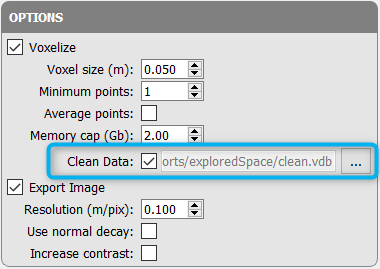
In the Export step Options check Clean Data and select the saved .vdb file to apply the cleaning mask to the exported map. |