
Manage Meshes
Several tools, starting from the mesh import to the mesh creation and manipulation are available.
In the next paragraphs a short overview.
Import Meshes
|
|
Reconstructor can import various type of mesh files; below all of them are listed. |

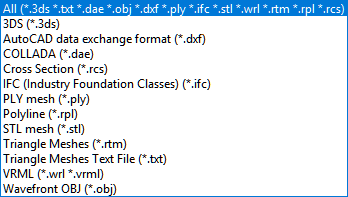
Some type of mesh need specific interface to be imported, you'll see it at the import start.
Mesh creation
Reconstructor® provides 4 typologies of mesh techniques. Different number and type of point clouds can be used as a basis to create a mesh, depending on the meshing technique:
|
|
On Grid Point Clouds |
On Unstructured Point Clouds |
Suggested for… |
|
|
|
Fast meshing technique that give back light meshes that may have holes in some situations. |
✓ |
|
To obtain a well defined and fast mesh from a single structured point cloud, with a good quality/computational time ratio |
|
|
Relatively slow meshing technique that gives back convex meshes without holes. It’s a view dependent, high defined mesh (each point is a vertex) |
✓ |
✓ |
Useful for façades (using orthocamera) and tunneling (using cylindrical camera) |
|
|
Approximate 3D meshing not view-dependent and taking as constraints the points' positions and orientations (normals) |
✓ |
✓ |
Useful for convex surfaces. |
|
|
Topographic Mesh [Only available in MINING add-on] Fast meshing algorithm designed for DTM models. It gives back a watertight, light, smoothed mesh useful for isolines and volumes calculation. |
✓ |
✓ |
Useful for land survey and mining |



Mesh manipulation
|
|
An editing environment to perform advanced operations such as hole-filling, borders detection, editing triangles and vertexes, smoothing surfaces, decimating, crests and toes extraction. |
|
|
Merge meshes into one This dialog allows to lump together in a single mesh an arbitrary set of triangle meshes |
|
|
To create an unstructured point cloud from mesh. |
|
|
Get mesh borders as polyline To create a new polyline containing the mesh's borders and add it to the project |
|
|
Mesh selection from current view point To cut a portion of a mesh using 2D video selection tools on the current view. |


Reconstructor® provides many other functions for editing meshes.