
Automatic Processing
|
|
In the Project window select the tracklet you want to process and click the Automatic Processing button. |

A batch window is displayed:
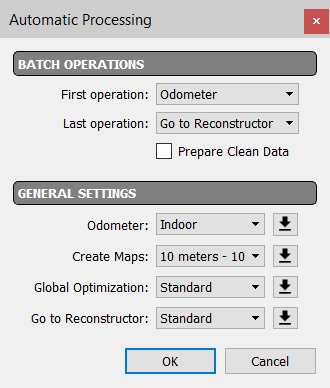
Here it's possible to set all the desired batching processes.
|
BATCH OPERATIONS |
Select the first and the last operation you want to run, choosing between: Odometer: this process calculates the single trajectory registering the clouds on it. Create Maps: this process creates the local maps to be used in the Global Optimizations process. Global Optimization: this process aligns the local maps. Go To Reconstructor: this process exports the results of a Global Optimization process, ready to be imported in a Reconstructor® project. Prepare Clean Data: if flagged, it cleans the maps deleting moving object data (example: walking people, moving cars, etc.) |
|
GENERAL SETTINGS |
All the steps can be processed with default or not presets.
|

 See Automatic mode to learn some tips to run the process with this automatic pipeline.